Veelgestelde vragen
Bestellen, bezorging & afhalen
Hoe kan ik bestellen?
- Ga naar het gewenste product (bijv. banner, bord, vlag).
- Selecteer alle opties (afmetingen, materiaal, afwerking, gaten, enz.).
- Upload uw bestand.
- Bevestigen en betalen.
- Wij produceren en verzenden.
General
Uploaden bestanden & bestellen, hoe werkt dat precies?
Tijdens de bestelstap kun je je ontwerp bestand uploaden. Het systeem zal technische checks doen (resolutie, bestandstype, snijmarges etc.). Is er iets mis, dan krijg je een melding of verzoek om aanpassing.
Wat zijn de levertijden van een product?
De levertijden van een product bepaal je zelf online, als je het product online geconfigureerd dan zie je als laatste stap, keuze “Selecteer je leverdatum”, De levertijd varieert per product en ligt doorgaans tussen 1 en 5 werkdagen., Veel producten bieden de optie “vandaag besteld, morgen geleverd”.
Tijdens het samenstellen van je bestelling kun je dit direct zien: in de laatste stap, ‘Kies je leverdatum’, bepaal je zelf wanneer je de levering wilt ontvangen.
Wat zijn de verzendkosten?
Jouw verzendkosten berekenen we automatisch. plaats de gewenste producten in de winkelwagen, kies het bezorgadres en selecteer de bezorgdatum. Je krijgt dan een overzicht van de beschikbare verzendopties inclusief de verzendkosten. Dit verschild per vervoerder: DHL, PostNL of ONB-bezorgdienst.
Levering op zaterdag mogelijk, maar brengt extra kosten met zich mee
Door de diversiteit van ons assortiment worden de verzendkosten berekend over de hele bestelling en dus niet voor ieder artikel apart.
Onze tip: combineer bestellingen en je betaalt slechts een keer verzendkosten met ONB
Kan ik de bestelling op een beurs, evenement of bouwplaats laten bezorgen?
Ja, geef het specifieke afleveradres en eventuele instructies door bij je bestelling. Wij bieden ook de koeriersdiensten van E-koeriers aan.
Is een levering in het buitenland ook mogelijk?
Naast geheel Nederland leveren we ook in geheel België, ook met alle vervoersdiensten, dus ook ONB.
Kan ik mijn bestelling afhalen?
Ja, we hebben meerdere afhaalpunten waaruit je kunt kiezen! Je kunt je bestelling afhalen bij een van de ONB-afhaalpunten in Dordrecht, Aalsmeer, Apeldoorn, Dokkum, Roermond en Bornem (België). De meeste artikelen die je op werkdagen voor 21:30 uur bestelt, kun je de volgende ochtend afhalen. Helaas is het niet mogelijk om je bestelling af te halen bij een PostNL of DHL afhaalpunt.
Kan ik een bestelling opnieuw plaatsen?
Ja, in je account kun je eerdere bestellingen eenvoudig opnieuw plaatsen via de bestelgeschiedenis.
Kan ik mijn bestelling annuleren?
Zolang de productie nog niet is gestart, kun je contact opnemen met onze klantenservice om de bestelling te annuleren.
Wat is de aanlevertijd voor een bestelling?
Bestanden dienen uiterlijk om 21:30 uur aangeleverd te zijn voor levering op de volgende werkdag.
Kan ik mijn bestelling wijzigen?
Wijzigingen zijn mogelijk zolang de productie nog niet is gestart. Neem zo snel mogelijk contact op met onze klantenservice.
Kom ik in aanmerking voor volumekorting?
Ja, bij grotere afnames bieden wij volumekorting. Neem contact op voor een offerte op maat.
Kan ik een offerte aanvragen?
Zeker, via onze website kun je eenvoudig een offerte aanvragen voor specifieke producten of aantallen.
Hoe kan ik klant worden bij QPrint.nl?
Registreer je via onze website met je bedrijfsgegevens om klant te worden.
Kan ik als Belgische ondernemer ook klant worden?
Ja, Belgische ondernemers kunnen zich registreren en gebruikmaken van onze diensten.
Hoe kan ik mijn klacht indienen?
Stuur een e-mail naar info@qprint.nl met een duidelijke omschrijving van je klacht.
Wat is de status van mijn klacht?
Na ontvangst van je klacht nemen we binnen 2 werkdagen contact met je op over de status.
Welke gegevens hebben jullie van mij?
In je account kun je alle opgeslagen gegevens inzien en beheren.
Hoe verwijder ik mijn account?
Stuur een verzoek tot verwijdering naar Info@qprint.nl .
Hoe kan ik mijn gegevens inzien?
Log in op je account om je persoonlijke en bedrijfsgegevens te bekijken.
Kan ik met mijn bedrijf buiten Nederland ook klant worden?
Ja, wij bedienen klanten in meerdere landen. Neem contact op voor specifieke informatie.
Kan ik mijn gegevens wijzigen?
Ja, log in op je account om je gegevens aan te passen.
Kan ik een artikel retourneren?
Retourneren is mogelijk onder bepaalde voorwaarden. Neem contact op met onze klantenservice voor de procedure.
Wanneer kan ik de klantenservice bereiken?
Onze klantenservice is bereikbaar van maandag tot en met vrijdag, van 09:00 tot 17:00 uur.
Pay
Hoe kan ik betalen?
Bij QPrint kun je betalen via iDEAL, creditcard of op rekening (na goedkeuring).
Waar kan ik mijn facturen vinden?
Log in op je account en ga naar ‘Facturen’ in het menu. Hier vind je een overzicht van al je facturen.
Hoe kan ik mijn factuuradres wijzigen?
Log in op je account en ga naar ‘Mijn gegevens’ om je factuuradres aan te passen.
Wat is het rekeningnummer (IBAN) van QPrint?
Ons IBAN is NL65INGB0115760202
Hoe ontvang ik mijn terugbetaling?
Terugbetalingen worden binnen 7 werkdagen verwerkt en gestort op het rekeningnummer waarmee de betaling is gedaan.
Wanneer betalen jullie terug na retourneren?
Na ontvangst en controle van de retourzending wordt het bedrag binnen 7 werkdagen teruggestort.
Materials & Products
Differences between materials
- Forex: plastic sheet, lightweight, suitable for indoor use or temporary outdoor use if not exposed to the weather for an extended period.
- Dibond: aluminum sandwich panel, robust, weather-resistant, excellent for outdoor use.
- Plexiglas (acrylic glass): transparent, glass look, luxurious appearance. You can drill into it (with the right drill), but caution is advised.
- Reboard: cardboard sheet material with a high strength-to-weight ratio; ideal for indoor use and temporary applications.
- PVC-free materials / recycled material: for customers who value sustainability.
Frames & mounting options
- Concealed mounting system: use spacers so that the plate “floats” at a distance from the wall.
- Drill holes / ring dots: can be incorporated into the design; we mill or drill them in.
- Outdoor frames: sturdy aluminum frames, textile frames, hammer frames etc.
- Beach flags: various models (teardrop, straight, hook) with accessories (ground stake, base plate, water bag).
- LED/illuminated frames: Pop-up LED frames, PixLip Go.
Files & Technical Specifications
Bleed
Add an extra margin (10 mm) around your design to ensure that no unwanted white edge appears when cutting.
Allowed file formats:
PDF (preferably), JPG, TIFF, high resolution.
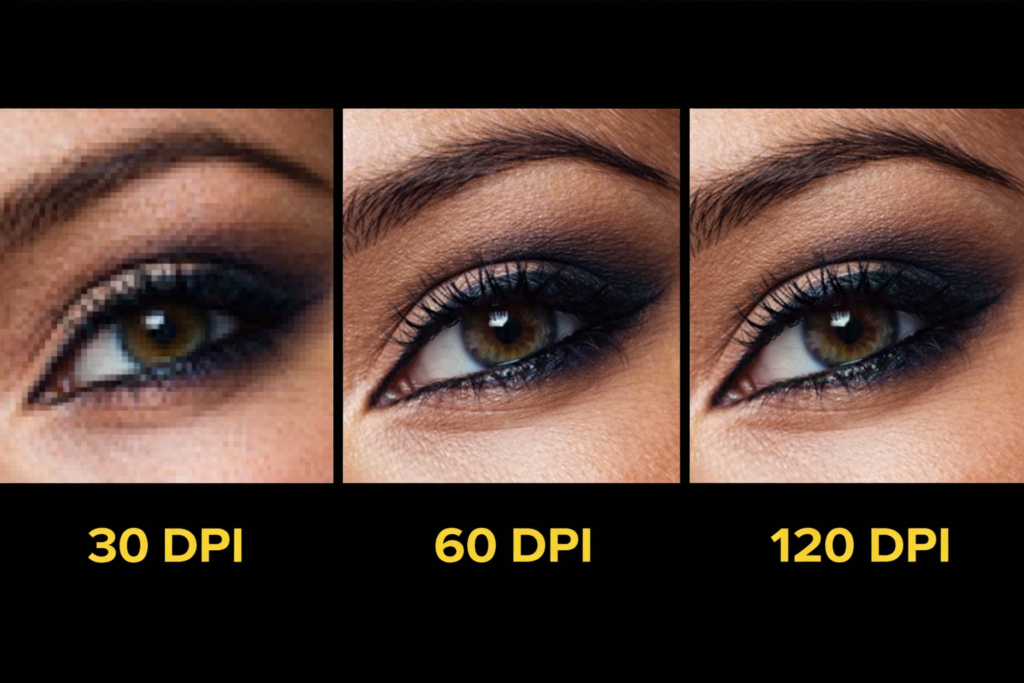
Ensure images are at least 72 dpi at actual size (preferably 200-300 dpi to be safe).
Embedded fonts and no text as outlines if possible (or as vector).
Cutcontour
Use a spot color (eg “CutContour”) in your design program to indicate where to cut.
Contours can be freeform shapes, rounded corners, or complex figures – as long as they can be technically maintained.
Files in Canva
- Set dimensions (note bleed, 1 cm all around)
- Create design in RGB or ideally CMYK (if Canva allows it)
- Download as high-resolution PDF or PNG
- Check resolution, crop margins, and that the colors are not saturated beyond vision.
Files, line thickness and height; (for Forex, Polystyrene and Evacast, among others)
- Optimal resolution: 150 PPI
- Minimum line thickness: 2 pt (subtraction: 2 pt)
- Minimum font size: 17 pt (negative: 17 pt)
- File type: PDF or JPG
- Embed fonts: Yes, recommended
- Crop marks: No, not allowed
- Max. file size: 2 GB
Color Profiles & Settings
For print, Fogra39 (EU) or other standard CMYK profiles are often used.
Set black text to 100% black and do not build it up from multiple colors. Please note that colors on the screen may differ from the print result – we handle color management, but minor differences are normal in print.
Templates & layout files
Templates are available for many products (downloadable via the product page).
Use these as a basis to correctly fit your design (with bleed, lines, etc.).
Kan ik meerdere bestanden aanleveren met verschillende designs?
Ja dat kan, als je bv 10 stuks besteld dan kun je ook in 1 keer 10 verschillende opmaken uploaden, dat is geen meerprijs!
Heb ik een goed drukwerkbestand?
Controleer:
- Resolutie (≥ 150 dpi, liever hoger)
- Kleurprofiel (CMYK of acceptabel kleurmodel)
- Afloop / bleed correct ingesteld
- Geen belangrijke elementen te dicht bij snijrand
- Snijlijnen of contourlijnen correct gedefinieerd
Applications & Practical Questions
Kan je ook mijn foto printen? Zeker.
Upload je foto bij het gewenste product (canvas, plexiglas, dibond etc.). Wij controleren automatisch of de resolutie geschikt is.
Als je twijfelt, kun je de foto eerst laten checken door ons.Is het mogelijk om zelf te boren in plexiglas / acrylglas?
Ja, maar voorzichtig. Gebruik een scherpe boor (bijv. HSS), langzaam draaien, voldoende smering/mechanisch koelen, en vermijd spanning in het materiaal.
Wij kunnen boorgaten voor je in het ontwerp meenemen zodat je dat zelf niet hoeft te doen.Bouwhekdoek welk materiaalkeuze moet ik gebruiken?
Mesh (gaatjesdoek) of dicht doek?
- Mesh: geperforeerd doek, ideaal bij wind omdat lucht erdoor kan.
- Dicht doek: maximale dekking en kleurvolume, geschikt in windluwe opstellingen.
Hufterproof reclamebord, wat betekent dat?
Een bord dat bestand is tegen vandalisme, weer en slijtage. Meestal sterk materiaal zoals Dibond of Trespa plus solide bevestigingstechniek.
Wat is het verschil tussen snijden en stansen (voor etiketten etc.)
- Snijden (cut): snijwerk langs een frezig of mes langs de contour
- Stansen: gebruik van een stansvorm (matrijs) om vormen uit te plettersen – ideaal bij grote series of complexe vormen
Outdoor Frames, welke passen voor jouw reclamedoelen?
- Stevige aluminium frames voor permanent buitengebruik
- Textielframes (wisselbare doeken) voor flexibel gebruik
- Klopframes, spandraamconstructies
- LED frames voor verlicht effect
Past jullie grondpen, grondplug of voetplaat op onze beachflag?
Ja, onze accessoires zijn ontworpen passend bij de beachflags die we leveren. Check wel formaat en diameter, maar in de praktijk sluiten ze goed aan.
Wat is het verschil tussen Pop-up LED frame en PixLip Go frame
- Pop-up LED frame: groter, stevig, vaak voor vaste presentaties
- PixLip Go: lichtgewicht, snel op te zetten, ideaal voor mobiele toepassingen
Akoestiek verbeteren met prints / panelen
Wij bieden akoestische panelen of fotopanelen met geluidsabsorptie, ideaal voor kantoren, vergaderruimtes, woonruimtes, grote zalen etc.